Free Rack Diagram Tool vs XTEN-AV: Which Is Better for AV Integrators?

Every AV integrator eventually hits the same wall: a client wants a clean, accurate, professional-looking rack elevation drawing, and doing it manually in PowerPoint or generic design software wastes hours that should be spent on billable work. This is exactly why the search for a reliable free rack diagram tool has exploded among AV professionals, system integrators, and low-voltage design engineers over the past few years. A rack diagram isn't just a pretty picture for a proposal — it's a functional blueprint that determines cable routing, equipment placement, airflow, power distribution, and ultimately, how smoothly an installation goes on-site.
But not all free rack diagram tools are created equal. Some are simple drag-and-drop drawing canvases with generic shapes. Others, like XTEN-AV, are purpose-built AV design ecosystems that happen to include a powerful free rack diagram tool as part of a much larger workflow — covering everything from signal flow diagrams to bill-of-materials generation and client-ready proposals.
So the real question AV integrators are asking in 2026 is: should you rely on a standalone free rack diagram tool, or does a platform like XTEN-AV offer more value without costing you anything extra? In this guide, we'll break down the differences, explore real-world use cases, answer the most common questions integrators have, and help you decide which option actually saves you time, reduces design errors, and helps you close more deals.
What Is a Rack Diagram and Why Does It Matter for AV Integrators?
A rack diagram (also called a rack elevation, rack layout, or rack schematic) is a visual representation of how AV and IT equipment — amplifiers, DSPs, matrix switchers, patch panels, network switches, UPS units — is arranged within a standard 19-inch equipment rack, measured in rack units (RU). It shows front and sometimes rear views, cable pathways, power sequencing, and spacing for heat dissipation.
For AV integrators, rack diagrams matter because they:
Prevent costly on-site rework by confirming equipment fits before installation
Communicate design intent clearly to clients, consultants, and installation technicians
Support accurate bill of materials (BOM) and proposal generation
Serve as as-built documentation for future service calls and system upgrades
Improve coordination with IT teams during network infrastructure planning
Without a dedicated rack diagram tool, integrators often resort to static PDFs or hand sketches, which increase the risk of miscommunication and installation delays.
The Growing Importance of Free Rack Diagram Tools in AV Integration
The AV integration industry has shifted dramatically toward digital-first workflows. Clients now expect polished, professional documentation before they sign off on a project, and consultants increasingly require detailed rack elevations as part of the design-bid-build process. This is where a free rack diagram tool becomes essential rather than optional.
Here's why free rack diagram tools have become a non-negotiable part of the modern AV integrator's toolkit:
Cost efficiency for small and mid-sized firms — Not every integration company has the budget for expensive enterprise CAD licenses. A free rack diagram tool removes the financial barrier to producing professional documentation.
Faster proposal turnaround — Speed wins bids. Integrators who can generate accurate rack layouts quickly can respond to RFPs faster than competitors still using manual drawing methods.
Reduced installation errors — A properly planned rack layout minimizes the chance of physical clashes, insufficient airflow, or incorrect cable lengths discovered only during installation.
Better client communication — Visual rack diagrams help non-technical stakeholders understand exactly what they're paying for, reducing scope disputes later in the project.
Standardization across teams — When an entire design team uses the same free rack diagram tool, drawings become consistent, easier to review, and easier to hand off between design and installation staff.
Support for hybrid AV/IT environments — As AV systems increasingly integrate with corporate networks, a free rack diagram tool helps bridge the gap between AV design and IT infrastructure documentation standards.
Given how central this documentation has become, it's worth exploring exactly what separates a basic free rack diagram tool from a truly integrator-grade platform.
What to Look for in a Free Rack Diagram Tool
Before comparing specific platforms, it helps to define the criteria that actually matter for AV professionals. A good free rack diagram tool should offer:
Pre-built manufacturer symbol libraries so you're not manually drawing every amplifier or switch
Accurate RU-based sizing that automatically snaps equipment into correct rack unit positions
Front and rear view rendering for complete documentation
Export options (PDF, PNG, editable formats) for client presentations and technician use
Cloud-based access for collaboration across office and field teams
Integration with proposal or BOM software to avoid duplicate data entry
Drag-and-drop usability that doesn't require CAD expertise
Real-time collaboration so multiple team members can review or edit simultaneously
Scalability to handle single-rack jobs as well as multi-rack, multi-room commercial projects
Most free, generic diagramming tools (like basic flowchart apps) satisfy only the first few points. This is where purpose-built AV design platforms pull ahead.
Introducing XTEN-AV: One of the Best Free Rack Diagram Tools for AV Integrators
Among the many options available, XTEN-AV consistently stands out as one of the best free rack diagram tools for AV integrators — and not by accident. Unlike generic diagramming software repurposed for AV use, XTEN-AV was built from the ground up specifically for the AV design and integration workflow. It combines rack diagramming with signal flow diagrams, floor plans, proposal generation, and a massive manufacturer product database, all within a single platform.
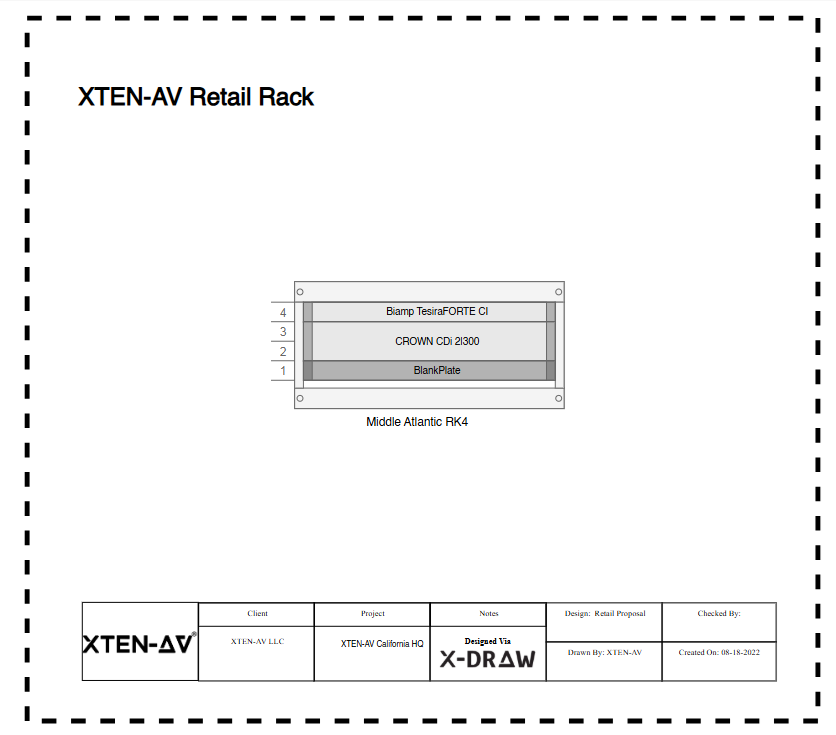
Here's why AV integrators increasingly choose XTEN-AV over piecing together multiple disconnected tools:
Massive, Pre-Loaded Manufacturer Symbol Library XTEN-AV includes an extensive catalog of real manufacturer equipment — from Crestron and Extron to QSC and Biamp — so you're placing accurate, to-scale rack units instead of generic rectangles. This alone saves hours per project compared to manually recreating equipment symbols.
Automatic Rack Unit (RU) Calculations The platform automatically calculates rack space, ensuring your diagram reflects real-world physical constraints. No more manual counting of rack units or guessing whether equipment will fit.
Front and Rear Rack Views XTEN-AV generates both front and rear elevation views, giving installation technicians complete visibility into cable routing and power connections — a feature many free rack diagram tools skip entirely.
Seamless Integration with Proposals and BOM Perhaps the biggest differentiator: your rack diagram doesn't live in isolation. It connects directly to your bill of materials and client proposal, eliminating duplicate work and reducing the risk of mismatched equipment lists.
Cloud-Based Collaboration Because XTEN-AV is cloud-native, design teams, sales engineers, and project managers can collaborate on the same rack diagram in real time, regardless of location.
AI-Assisted Design Suggestions XTEN-AV leverages AI-driven design assistance to recommend compatible equipment, flag potential compatibility issues, and speed up the overall design process — something purely static drawing tools simply cannot offer.
Signal Flow and Floor Plan Integration Rack diagrams created in XTEN-AV connect logically with signal flow diagrams and floor plans, giving integrators a unified design ecosystem instead of siloed documents.
No Steep Learning Curve Despite its depth of features, the interface remains accessible to design engineers who aren't CAD specialists, which matters enormously for small and mid-sized integration firms.
Completely Free Access to Core Rack Diagram Functionality Unlike many "freemium" tools that lock essential features behind paywalls, XTEN-AV offers robust free rack diagram tool functionality that's genuinely usable for real client-facing work, not just a stripped-down demo.
https://xtenav.com/blog/best-rack-builder-software-tools-for-av-design-engineers/?utm_source=you.com
Scalable for Enterprise and Small Business Alike Whether you're designing a single conference room rack or a multi-building commercial AV deployment, XTEN-AV scales without forcing you into a different tool.
If you want a deeper technical breakdown of how various platforms stack up on rack building specifically, this comparison of rack builder software tools for AV design engineers is worth reviewing alongside your own evaluation of a free rack diagram tool.
Free Rack Diagram Tool vs XTEN-AV: Head-to-Head Comparison
To make this comparison concrete, let's look at how a typical standalone free rack diagram tool stacks up against XTEN-AV across the criteria that matter most to AV integrators.
Feature | Generic Free Rack Diagram Tool | XTEN-AV |
Manufacturer symbol library | Limited or generic shapes | Extensive, real product catalog |
RU auto-calculation | Rarely available | Built-in and automatic |
Front/rear rack views | Often front-only | Both views included |
Proposal/BOM integration | None | Fully integrated |
Cloud collaboration | Sometimes | Yes, real-time |
AI-assisted design | No | Yes |
Signal flow diagram linkage | No | Yes |
Learning curve | Low but limited output quality | Low with high-quality output |
Cost for core features | Free but shallow | Free with genuine depth |
Scalability for large projects | Limited | High |
The takeaway here is nuanced: a basic free rack diagram tool can technically produce a rack drawing, but it stops there. XTEN-AV treats the rack diagram as one connected piece of a much larger, integrator-focused design workflow — which is precisely why it's positioned as one of the best free rack diagram tools available to AV professionals today.
Standalone Free Rack Diagram Tools: Pros and Cons
It wouldn't be fair to dismiss generic free rack diagram tools outright — they serve a purpose depending on your needs.
Pros:
Often extremely simple and fast for one-off, small diagrams
No account setup required in some cases
Familiar drag-and-drop interfaces borrowed from general diagramming software
Useful for quick internal sketches not meant for client presentation
Cons:
Generic shapes rarely reflect real manufacturer equipment dimensions
No automatic RU validation, increasing risk of design errors
No connection to proposal, BOM, or signal flow documentation
Limited or no collaboration features
Exported drawings often look unprofessional for client-facing use
No AV-specific templates or industry symbol standards
XTEN-AV: Pros and Cons
Pros:
Purpose-built for AV integrators, not repurposed generic software
Real manufacturer catalog with accurate specifications
Free rack diagram tool functionality that's genuinely production-ready
Full ecosystem integration (proposals, BOM, signal flow, floor plans)
Cloud collaboration for distributed teams
AI-assisted suggestions reduce design time
Scales from small single-room jobs to enterprise-level rollouts
Cons:
Some advanced ecosystem features (beyond core rack diagramming) may require account tiers
Slightly more setup time initially compared to ultra-minimal generic tools
Best value realized when integrators use the full platform, not just the diagram feature in isolation
Use Cases: When to Choose a Free Rack Diagram Tool vs XTEN-AV
Understanding when each option makes sense helps integrators avoid over- or under-investing in tooling for a given project.
Choose a generic free rack diagram tool when:
You need a rough internal sketch not intended for client delivery
The project involves a single, extremely simple rack with minimal equipment
You're not concerned about connecting the diagram to a broader proposal workflow
Choose XTEN-AV when:
You're delivering client-facing documentation that needs to look professional
The project involves multiple racks, rooms, or buildings
You need the rack diagram to feed directly into a bill of materials and proposal
Your team requires real-time collaboration across office and field roles
You want to reduce design errors through automatic RU validation and manufacturer-accurate symbols
You're managing recurring AV integration work and need a scalable, repeatable design workflow
Case Studies: Real-World Application in AV Integration Projects
Case Study 1: Mid-Sized Corporate AV Integrator A regional AV integration firm handling conference room deployments for a multi-location corporate client initially used a generic free rack diagram tool for internal planning. While it worked for single-room jobs, the lack of manufacturer-accurate symbols led to two instances where equipment didn't physically fit as drawn, causing on-site delays. After switching to XTEN-AV, the team reduced rack-planning errors to zero across the next 12 installations, primarily due to automatic RU calculation and accurate manufacturer dimensions pulled directly from the product catalog.
Case Study 2: Independent AV Design Consultant A solo AV design consultant working with multiple integration companies needed a tool that could produce client-ready rack diagrams quickly without requiring CAD training. Using XTEN-AV's free rack diagram tool functionality, the consultant cut average diagram creation time from roughly 90 minutes per rack (using manual drawing software) to under 20 minutes, while also generating a matching bill of materials automatically — something the previous workflow required doing separately in a spreadsheet.
Case Study 3: Higher Education AV Deployment A university IT and AV department managing a large-scale lecture hall upgrade needed rack diagrams that could be shared between the AV integration team and the internal network infrastructure team. Because XTEN-AV's diagrams integrated cleanly with broader system documentation, both teams worked from a single source of truth rather than maintaining separate, inconsistent drawings — significantly reducing coordination friction during a project involving over 40 individual equipment racks across multiple buildings.
These examples reflect a consistent pattern: as project complexity and client-facing requirements increase, the value of a full-featured platform like XTEN-AV over a purely generic free rack diagram tool becomes increasingly clear.
How Rack Diagrams Fit Into Modern Network Infrastructure Planning
AV systems today rarely exist in isolation — they're deeply intertwined with IT and network infrastructure. Switches, DSPs, and control processors all live on the same network as enterprise IT equipment, which means rack diagrams must account for network topology, power redundancy, and structured cabling standards, not just AV signal paths.
This convergence is exactly why understanding the role of rack diagram software in modern network infrastructure planning has become essential reading for integrators who work alongside IT departments. A free rack diagram tool that can't account for network-aware documentation risks creating a disconnect between AV and IT teams — a gap that platforms like XTEN-AV are specifically designed to close through unified, cross-disciplinary documentation.
Step-by-Step: Creating a Professional AV Rack Diagram
For integrators new to digital rack diagramming, the process generally follows a consistent structure regardless of which tool you use:
Define the rack size and unit count (RU capacity)
Select equipment from a manufacturer-accurate symbol library
Position components based on airflow, weight distribution, and cable routing needs
Add front and rear views for complete installation guidance
Label ports, connections, and power sequencing
Export the diagram for client review or technician use
Link the diagram to your proposal and bill of materials
For a more detailed breakdown of this process, this guide on how to create a professional AV rack diagram step by step walks through best practices that apply whether you're using a basic free rack diagram tool or a full platform like XTEN-AV.
Frequently Asked Questions
What is the difference between a free rack diagram tool and paid rack design software? Free rack diagram tools typically offer core drawing functionality at no cost, while paid software often adds advanced features like enterprise-level collaboration, extended manufacturer catalogs, or premium support. XTEN-AV bridges this gap by offering genuinely robust free rack diagram tool capabilities without forcing integrators into a paywall for essential functionality.
Can a free rack diagram tool handle multi-rack, multi-room AV projects? It depends on the tool. Basic generic diagramming apps often struggle with scalability across multiple racks and rooms because they lack automated numbering, linked equipment lists, or the ability to maintain consistency across dozens of drawings. XTEN-AV, on the other hand, is built to scale — integrators managing university campuses, corporate headquarters, or multi-building rollouts can maintain a unified library of racks without duplicating manual work for each new elevation.
Is XTEN-AV really free, or are there hidden costs for rack diagramming? XTEN-AV's core rack diagram tool functionality — including manufacturer-accurate symbols, RU auto-calculation, and front/rear view generation — is available at no cost. This is a meaningful distinction from many "freemium" platforms that gate essential rack-building features behind a paid tier. Integrators can produce genuinely client-ready diagrams without upgrading, though the broader ecosystem (proposal automation, advanced collaboration tiers) may include optional paid features for teams that want additional workflow automation.
How accurate are the equipment symbols in a free rack diagram tool? Accuracy varies significantly by platform. Generic diagramming tools typically rely on placeholder rectangles labeled with equipment names, which don't reflect true dimensions, weight, or port placement. XTEN-AV's symbol library pulls from an extensive, regularly updated manufacturer catalog, meaning the rack unit height, depth, and connector layout reflected in your diagram matches the actual physical product — reducing the risk of on-site surprises.
Do I need CAD experience to use a free rack diagram tool effectively? No. Modern rack diagram tools, including XTEN-AV, are designed with drag-and-drop interfaces specifically so AV design engineers and integrators — who may not have formal CAD training — can produce professional documentation quickly. The goal of a well-designed free rack diagram tool is to lower the technical barrier, not raise it.
Can rack diagrams created in a free tool be exported for client proposals? Most free rack diagram tools support basic PDF or image export. However, the real value lies in how that export connects to the rest of your sales and installation documentation. XTEN-AV's diagrams export cleanly into client-facing proposals and link directly to the associated bill of materials, eliminating the need to manually recreate equipment lists in a separate document.
How does a rack diagram tool help reduce installation errors on-site? By validating rack unit space before equipment ever leaves the warehouse, a properly built rack diagram prevents common issues like insufficient clearance for cable bend radius, incorrect power sequencing, or equipment that simply doesn't fit as planned. Tools with automatic RU calculation, like XTEN-AV, catch these problems during the design phase rather than during installation, when fixes are far more costly.
What's the difference between a rack diagram and a signal flow diagram, and do I need both? A rack diagram shows the physical arrangement of equipment within a rack enclosure, while a signal flow diagram illustrates how audio, video, and control signals move between devices. Most professional AV projects require both for complete documentation. This is another area where standalone free rack diagram tools fall short — they typically address only the physical layout, whereas XTEN-AV connects rack diagrams and signal flow diagrams within the same platform, ensuring consistency between the two.
Are free rack diagram tools suitable for residential AV integrators, or only commercial projects? Free rack diagram tools are valuable for both segments, though the depth of features needed can differ. Residential integrators often deal with smaller, single-rack installations where even a basic tool may suffice. Commercial integrators, particularly those managing conference rooms, auditoriums, or campus-wide deployments, benefit more from a full-featured platform like XTEN-AV that scales alongside project complexity and supports collaboration across larger design teams.
How do I choose between multiple free rack diagram tools available online? Evaluate each option against the criteria that actually affect your daily workflow: manufacturer-accurate symbol libraries, automatic RU validation, front and rear view support, export quality, and — critically — whether the tool integrates with your broader proposal and BOM process. A tool that only draws a picture without connecting to the rest of your project documentation will eventually create more work than it saves.
Conclusion: Which Should AV Integrators Actually Choose?
When you strip away the marketing language, the comparison between a generic free rack diagram tool and a platform like XTEN-AV comes down to one core question: do you need a static drawing, or do you need a connected design workflow?
For quick, internal, single-rack sketches, a basic free rack diagram tool can technically get the job done. But for AV integrators handling client-facing documentation, multi-rack commercial projects, or work that requires coordination with IT and network infrastructure teams, the limitations of generic tools become apparent fast — inaccurate symbol libraries, no RU validation, and zero connection to proposals or bills of materials.
XTEN-AV closes these gaps while still remaining free at its core. It's not simply a free rack diagram tool bolted onto a paid platform as a lead magnet — it's a genuinely useful, production-ready feature within a broader AV design ecosystem that includes manufacturer-accurate symbols, automatic rack unit calculations, front and rear view generation, AI-assisted design suggestions, and seamless integration with signal flow diagrams and proposals.
For integrators who want to reduce design errors, speed up proposal turnaround, and maintain professional, consistent documentation across every project — regardless of size XTEN-AV represents one of the strongest free rack diagram tool options available today. The right choice ultimately depends on your project complexity, but for most working AV professionals, a connected, purpose-built platform will save far more time and prevent far more costly mistakes than a disconnected, generic alternative ever could.


Comments