Conference Room AV Setup Cost Breakdown: What Businesses Should Expect in 2026

As businesses navigate the conference room audio visual (av) setup landscape in May 2026, understanding the true cost of implementing professional collaboration technology has become essential for making informed investment decisions and avoiding budget surprises. The AV industry has experienced significant shifts over the past two years—supply chain stabilization, AI-powered equipment proliferation, sustainability requirements, and the maturation of hybrid work have all fundamentally reshaped both technology specifications and pricing structures. What once seemed like straightforward equipment procurement now involves complex decisions about cloud subscriptions, AI features, IoT integration, and lifecycle management that impact total cost of ownership far beyond initial capital expenditure.
The average conference room AV setup in mid-2026 ranges from $3,000 for basic huddle rooms to $150,000+ for premium executive boardrooms, but these figures only tell part of the story. Hidden costs in network infrastructure upgrades, professional installation, programming and commissioning, training, ongoing subscriptions, and support contracts can add 30-50% to initial equipment budgets if not properly anticipated. Choosing the best software for conference room audio visual (av) setup projects becomes financially critical, as professional design platforms like XTEN-AV X-Draw that provide accurate equipment specifications, automated BOM generation, and comprehensive documentation reduce estimating errors by 50-70%, directly protecting project profitability and preventing costly field changes.
This comprehensive cost guide provides AV integrators, consultants, technology managers, and business leaders with realistic 2026 pricing benchmarks, cost factor analysis, and budgeting strategies for successful Audio Visual (AV) setup for conference room deployments.
Key Takeaways
Average conference room AV costs in 2026: Huddle rooms $3,000-$12,000, Standard meeting rooms $15,000-$40,000, Large conference rooms $40,000-$85,000, Executive boardrooms $85,000-$250,000+
Total project costs typically break down: Equipment 55-65%, Installation 20-30%, Programming/Commissioning 8-12%, Training/Documentation 5-8%
Network infrastructure upgrades add $2,000-$15,000 per room depending on existing capabilities
AI-powered equipment commands 15-30% premium over traditional AV but delivers ROI within 18-24 months through reduced support
Microsoft Teams Rooms and Zoom Rooms certified systems range $8,000-$45,000 depending on room size
Subscription costs for cloud management, analytics, and premium features add $500-$3,000 annually per room
Professional design software like XTEN-AV X-Draw reduces estimating errors by 50-70%, preventing costly overruns
Sustainability-focused equipment (energy-efficient displays, power management) adds 10-15% initially but saves 40-60% in operational costs
Total cost of ownership over 5 years is 2.5-3.5x initial equipment investment when including all factors
Proper budgeting should include 15-20% contingency for unforeseen challenges and change orders

What Is a Conference Room AV Setup?
A conference room AV setup encompasses the complete audiovisual ecosystem—including hardware, software, infrastructure, installation services, and support—required to transform a physical space into a functional collaboration environment. In May 2026, professional conference room AV systems have evolved beyond basic displays and speakers to include AI-powered cameras, intelligent audio processing, cloud-native management platforms, analytics services, and IoT integration that collectively enable effective hybrid meetings and modern workplace collaboration.
Core Cost Components
Equipment Hardware (55-65% of Total)
Displays (flat panels, video walls, interactive displays)
Audio systems (microphones, speakers, DSPs, amplifiers)
Video conferencing (cameras, codecs, USB conferencing bars)
Control systems (processors, touch panels, wireless controllers)
Network infrastructure (switches, cabling, extenders)
Mounting hardware and furniture integration
Equipment racks and power management
Professional Services (20-30% of Total)
System design and engineering
Project management and coordination
Installation labor and cable termination
Equipment configuration and programming
System commissioning and testing
User training and documentation delivery
Ongoing Costs (8-12% Annually)
Software subscriptions (Teams Rooms, Zoom Rooms, management platforms)
Support contracts and warranty extensions
Preventive maintenance visits
Remote monitoring services
Software updates and feature upgrades
Why Businesses Are Investing in AV Upgrades in 2026
Understanding cost drivers requires recognizing why organizations prioritize conference room technology investments in mid-2026:
1. Hybrid Work Permanence
Remote and hybrid work has stabilized as permanent business model, making high-quality video conferencing infrastructure essential rather than optional. Organizations recognize that poor AV experiences directly impact employee productivity and satisfaction.
2. Competitive Talent Recruitment
Modern collaboration technology has become a recruitment and retention differentiator. Employees—especially younger workers—evaluate workplace technology when choosing employers.
3. Client Experience Expectations
Professional video meetings with clients and partners are now standard business practice. Poor AV quality during client presentations damages credibility and competitiveness.
4. Legacy System Obsolescence
Conference room equipment installed 5-7+ years ago lacks AI features, cloud management, 4K video, and modern platform compatibility (Teams Rooms, Zoom Rooms), driving refresh cycles.
5. ROI from Technology Investment
Organizations see measurable return on investment from quality AV: reduced travel expenses, improved meeting productivity, better space utilization, and lower support costs through AI-powered reliability.
6. Sustainability Mandates
ESG commitments and green building certifications drive investment in energy-efficient displays, intelligent power management, and lifecycle-optimized equipment.
Average Conference Room AV Setup Cost in 2026
Based on May 2026 market data from AV integrators and equipment distributors:
Conference Room Cost by Size/Type
Room Type | Occupancy | Equipment Cost | Installation | Programming | Total Range |
Small Huddle Room | 2-4 people | $2,000-$6,000 | $500-$2,000 | $300-$800 | $3,000-$9,000 |
Medium Huddle Room | 4-6 people | $4,000-$8,000 | $800-$2,500 | $500-$1,200 | $5,500-$12,000 |
Standard Meeting Room | 8-12 people | $10,000-$25,000 | $4,000-$8,000 | $2,000-$5,000 | $16,000-$38,000 |
Large Conference Room | 12-20 people | $25,000-$55,000 | $8,000-$15,000 | $5,000-$12,000 | $38,000-$82,000 |
Executive Boardroom | 12-24 people | $55,000-$150,000 | $15,000-$40,000 | $10,000-$25,000 | $80,000-$215,000 |
Premium Boardroom | 16-30 people | $150,000-$400,000+ | $35,000-$80,000 | $20,000-$50,000 | $205,000-$530,000+ |
Detailed Cost Examples by Room Type
Small Huddle Room (3-4 People) - $6,500 Average
Equipment ($4,200):
55" 4K display: $800
USB conferencing bar (camera, mic, speakers): $1,800
Wall mount: $150
HDMI cables and accessories: $200
Network switch (4-port PoE): $350
Wireless presentation adapter: $900
Installation ($1,500):
Display mounting and wiring: $600
Network drop installation: $400
Cable management: $300
Testing and commissioning: $200
Programming ($800):
Zoom Rooms or Teams Rooms setup: $500
Network configuration: $200
Documentation: $100
Standard Meeting Room (10 People) - $28,000 Average
Equipment ($18,000):
75" 4K commercial display: $2,500
Ceiling microphone array (8-element): $2,800
PTZ camera with auto-framing: $2,200
Ceiling speakers (pair): $1,200
DSP with AEC and auto-mixing: $2,500
Touch panel control (10"): $1,800
Wireless presentation system: $2,200
Network switch (16-port PoE++): $1,200
Equipment rack and power: $800
Cables, connectors, mounting: $800
Installation ($6,500):
Display mounting: $800
Ceiling mic and speaker installation: $1,800
Camera mounting and aiming: $600
Cable pulling and termination: $1,500
Equipment rack assembly: $800
Testing and burn-in: $1,000
Programming & Commissioning ($3,500):
Control system programming: $1,500
DSP configuration and audio tuning: $1,200
Teams/Zoom Rooms certification: $500
Network VLAN and QoS setup: $300
Executive Boardroom (16 People) - $125,000 Average
Equipment ($80,000):
Dual 86" 4K OLED displays: $12,000
Advanced ceiling mic array (16-element): $5,500
Dual PTZ cameras with AI tracking: $8,500
Architectural in-ceiling speakers (4): $4,500
Enterprise DSP platform: $6,000
Premium touch panel control (15"): $3,500
Wireless presentation (dual-display): $3,800
Confidence monitor (55"): $1,200
Network switch (24-port 10GbE): $3,500
Professional equipment rack system: $2,500
Power conditioning and UPS: $4,000
Furniture integration (table boxes, cable mgmt): $8,000
Premium cables and connectors: $3,500
Motorized shades integration: $5,000
Room scheduling display: $1,200
Acoustic panels and treatment: $7,300
Installation ($25,000):
Display mounting and integration: $3,500
Audio system installation: $5,000
Camera installation and calibration: $2,000
Extensive cable infrastructure: $6,000
Equipment rack build and install: $2,500
Furniture integration work: $3,000
Testing and commissioning: $3,000
Programming & Commissioning ($20,000):
Advanced control programming: $8,000
DSP audio tuning and optimization: $4,500
Multi-camera AI configuration: $2,000
Network architecture setup: $1,500
Integration testing (lighting, shades): $2,000
Comprehensive documentation: $2,000
Factors That Affect Conference Room AV Pricing
Understanding cost variables enables more accurate budgeting:
1. Room Size and Occupancy
Larger spaces require:
More microphone elements or multiple arrays for coverage
More powerful or additional speakers
Larger displays or multi-display configurations
More complex video switching and distribution
Cost Impact: 30-50% increase per size tier (huddle → standard → large → boardroom)
2. Technology Tier and Features
Feature escalation significantly impacts costs:
Entry-Level:
Consumer-grade displays
All-in-one USB conferencing bars
Software-based control
Basic 1080p video Cost: $3,000-$8,000
Professional:
Commercial displays
Component-based audio systems
Touch panel control
4K video with auto-framing Cost: $15,000-$40,000
Premium:
High-end displays (OLED, MicroLED)
Architectural audio integration
Custom control programming
AI-powered video with multi-camera Cost: $80,000-$250,000+
3. Platform Choice (Teams Rooms vs. Zoom Rooms vs. BYOD)
Microsoft Teams Rooms:
Certified equipment often commands 10-20% premium
Licensing adds $25-$40/month per room
Better integration for Microsoft 365 organizations Total Impact: +$2,000-$5,000 initial, +$300-$480 annual
Zoom Rooms:
Certified devices with proven compatibility
Licensing requires $49/month per room
Consistent user experience across locations Total Impact: +$1,500-$4,000 initial, +$588 annual
Platform-Agnostic BYOD:
Lower initial cost (no certification requirements)
More flexibility but less consistency
Variable user experience Total Impact: Baseline cost
4. New Construction vs. Retrofit
Installation environment dramatically affects labor costs:
New Construction:
Conduit pre-installed during building phase
Easy ceiling access before finishes
Coordinated with other trades Labor Savings: 25-40% versus retrofit
Retrofit/Existing Spaces:
Surface-mounted cable runs
Limited ceiling access
Occupied building constraints
After-hours work requirements Labor Premium: +40-80% over new construction
5. Infrastructure Requirements
Existing infrastructure capacity impacts costs:
Adequate Infrastructure:
Sufficient electrical circuits
Network switches with available ports and PoE capacity
Acceptable cable pathways Additional Cost: Minimal ($500-$2,000)
Infrastructure Upgrades Needed:
New dedicated circuits and UPS
Network switch upgrades for PoE++ and bandwidth
New conduit and cable tray installation Additional Cost: $5,000-$20,000 per room
6. Acoustic Treatment Requirements
Room acoustics affect both equipment needs and treatment costs:
Good Starting Acoustics:
Carpeted floors, acoustic ceiling tiles, soft furnishings
Minimal treatment needed Additional Cost: $500-$2,000
Poor Starting Acoustics:
Hard surfaces (glass, concrete, hard ceilings)
Extensive acoustic panels required
Potentially upgraded audio equipment to compensate Additional Cost: $5,000-$25,000
7. Geographic Location
Regional cost variations affect labor rates:
Major Metro Areas (NYC, SF, LA):
Installation labor: $125-$200/hour
Programming: $150-$250/hour
Mid-Tier Cities:
Installation labor: $85-$125/hour
Programming: $100-$150/hour
Secondary Markets:
Installation labor: $65-$95/hour
Programming: $75-$125/hour
Impact: 20-40% cost difference between regions for identical systems
8. Integration Complexity
System sophistication affects programming costs:
Simple Systems:
Single video platform (Teams or Zoom)
Basic control (power, source select, volume)
Standalone operation Programming: $500-$2,000
Complex Systems:
Multiple video platforms
Building automation integration (lighting, shades, HVAC)
Multi-room audio distribution
Advanced control scenarios Programming: $8,000-$25,000+
9. Vendor Selection
Provider type influences pricing:
National AV Integrators:
Premium pricing (+20-30%)
Proven processes and comprehensive warranties
Multi-location consistency
Regional AV Integrators:
Competitive pricing
Strong local relationships
Personalized service
IT Service Providers:
Lower pricing for basic systems
Limited AV specialization
Focus on simple deployments
10. Urgency and Timeline
Project schedule impacts costs:
Standard Timeline (8-12 weeks):
Normal equipment lead times
Standard labor rates Baseline cost
Expedited Timeline (4-6 weeks):
Rush equipment orders (+10-20%)
Overtime labor (+25-50%)
Coordination challenges Premium: +15-35% total
Conference Room AV Setup Cost by Room Type
Huddle Room (2-6 People): $3,000-$12,000
Typical Use: Quick team meetings, one-on-ones, personal video calls
Technology Approach: All-in-one solutions (USB conferencing bars, soundbars)
Cost Breakdown:
Equipment: 60-70% ($2,000-$8,000)
Installation: 20-30% ($600-$2,500)
Configuration: 10-15% ($400-$1,500)
Popular Configurations:
Basic Huddle ($3,500-$5,500):
42-55" display
Basic USB conferencing bar
Simple mounting
Wireless screen sharing
Enhanced Huddle ($6,000-$9,000):
55-65" commercial display
Premium USB conferencing bar with AI
Touch panel control
Zoom/Teams Rooms certification
Premium Huddle ($9,000-$12,000):
65-75" 4K display
Separate camera, ceiling mics, ceiling speakers
Dedicated DSP
Professional control system
Standard Meeting Room (8-12 People): $15,000-$40,000
Typical Use: Departmental meetings, client presentations, video conferences
Technology Approach: Component-based systems with professional audio
Cost Breakdown:
Equipment: 55-65% ($10,000-$26,000)
Installation: 20-30% ($4,000-$9,000)
Programming: 12-18% ($2,500-$6,500)
Popular Configurations:
Entry Professional ($16,000-$22,000):
Single 75" display
Ceiling mic array (4-8 elements)
PTZ camera
Ceiling speakers
Basic DSP
Touch control
Mid-Range Professional ($23,000-$32,000):
80-85" display
Advanced ceiling mic array (8-12 elements)
PTZ camera with AI framing
Premium ceiling speakers
Professional DSP
Teams/Zoom Rooms certified
Wireless presentation
High-End Professional ($33,000-$40,000):
Dual 75" displays or single 98"
Ceiling mic array with beamforming
Multiple cameras
Architectural speakers
Enterprise DSP
Custom control programming
Building automation integration
Large Conference Room (12-20 People): $40,000-$85,000
Typical Use: All-hands meetings, board presentations, training sessions
Technology Approach: Advanced component systems with multiple zones
Cost Breakdown:
Equipment: 55-65% ($25,000-$55,000)
Installation: 20-28% ($8,000-$20,000)
Programming: 12-18% ($6,000-$15,000)
Typical Configuration ($55,000-$65,000):
Dual 86" 4K displays
Advanced ceiling mic array (12-16 elements)
Dual PTZ cameras
Distributed ceiling speakers (4-6)
Professional DSP platform
Premium touch panel control
Wireless presentation (dual-display)
Confidence monitor
Equipment rack in IDF
Comprehensive network infrastructure
Executive Boardroom (12-30 People): $85,000-$250,000+
Typical Use: Board meetings, executive sessions, VIP presentations
Technology Approach: Premium systems with architectural integration
Cost Breakdown:
Equipment: 60-70% ($55,000-$175,000)
Installation: 18-25% ($18,000-$50,000)
Programming: 12-18% ($12,000-$30,000)
Premium Features Adding Cost:
Motorized displays or video walls (+$15,000-$50,000)
Architectural audio (concealed speakers/mics) (+$10,000-$35,000)
Custom millwork integration (+$15,000-$60,000)
Redundant systems for reliability (+$20,000-$40,000)
Advanced lighting control (+$8,000-$25,000)
Holographic telepresence (emerging) (+$50,000-$150,000)
Best AV Design & Planning Software for Conference Room Projects
Accurate cost estimation requires professional design tools that prevent the 50-70% budget overruns common when using spreadsheets or generic CAD:
XTEN-AV X-Draw
XTEN-AV X-Draw has become the industry-standard platform for AV integrators and consultants creating accurate conference room audio visual (av) setup cost estimates in 2026. Its comprehensive capabilities directly address the cost estimation challenges that plague projects relying on manual methods or inadequate tools.

How X-Draw Ensures Accurate Cost Estimation
1. AV-Specific Drawing Automation
X-Draw automates the documentation workflows that feed accurate cost estimates:
Comprehensive signal flow diagrams ensuring no equipment forgotten
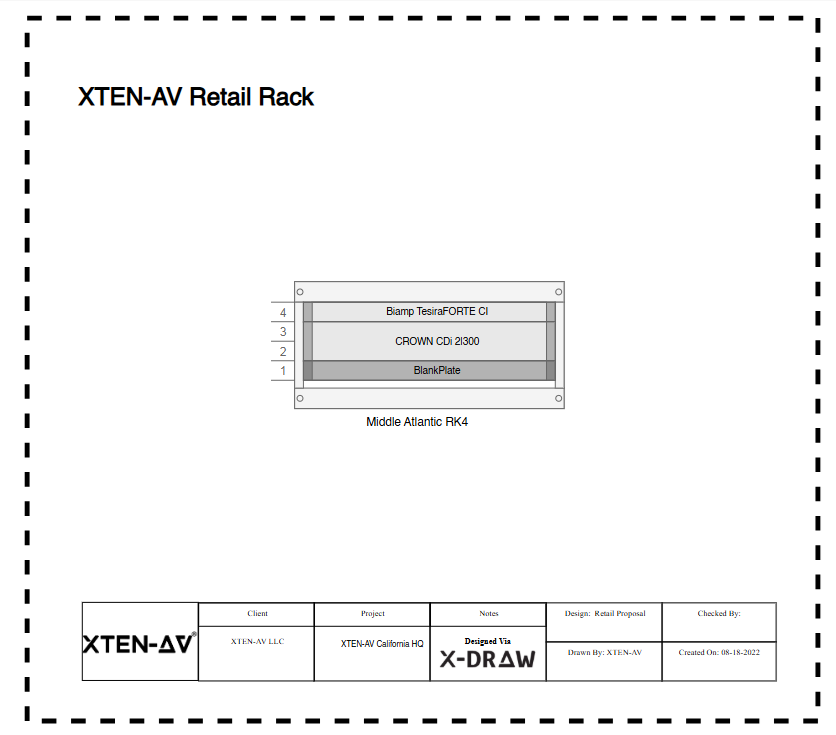
Detailed rack layouts capturing all mounting, power, and cooling requirements
Precise floor plans documenting exact cable runs and pathways
Elevation drawings showing all mounting hardware needs
Complete cable routing diagrams with accurate length calculations
This automation eliminates the 30-50% equipment omissions that occur with manual spreadsheet estimates.
2. Automated Signal Flow Diagrams
X-Draw's intelligent automation ensures complete system specifications:
Auto-generates all signal paths preventing missing cables or adapters
Updates BOMs dynamically when design changes
Validates equipment compatibility avoiding costly specification errors
Identifies all required accessories (cables, connectors, adapters)
This prevents the $2,000-$8,000 in "forgotten items" that often appear as change orders.
3. Massive AV Product Library with Real-Time Pricing
X-Draw provides accurate equipment costs:
1.5M+ products with current distributor pricing
5200+ brands ensuring specifications match actual available products
Real-time price updates reflecting market conditions
Alternative product suggestions for value engineering
This eliminates the 15-25% pricing errors from outdated catalogs or manual research.
4. Conference Room Templates with Proven Costs
X-Draw includes templates based on thousands of completed projects:
Proven equipment packages for each room type
Historical cost data from actual installations
Realistic labor estimates based on real projects
Common accessory lists preventing omissions
Templates reduce estimating time from 8-12 hours to 1-2 hours while improving accuracy by 50-70%.
5. Upload & Edit Floor Plans for Accurate Cable Calculations
X-Draw enables precise quantity calculations:
Upload actual architectural plans with correct dimensions
Measure exact cable runs accounting for vertical rises
Calculate precise quantities eliminating over/under ordering
Document pathway requirements for accurate labor estimates
This prevents the 20-40% cable quantity errors common with manual estimates.
6. Intelligent Cable Labeling with Automatic Schedules
X-Draw generates comprehensive cable schedules:
Complete cable lists with types, lengths, connectors
Automatic quantity calculations from routing diagrams
Accessory requirements (wall plates, cable trays, labels)
Labor hour estimates based on cable complexity
Automated cable schedules reduce estimation time by 70% while improving accuracy
dramatically.
7. Integrated BOM Generation
X-Draw's most valuable cost feature is automated BOM creation:
Real-time equipment lists updating as design evolves
Current pricing from distributor integrations
Complete accessory lists (often forgotten in manual estimates)
Labor hour calculations based on equipment complexity
Organized by system (audio, video, control, network)
Organizations using X-Draw report 50-70% reduction in estimating errors and $5,000-$25,000 savings per project from accurate specifications.
8. Cloud-Based Collaboration for Client Approvals
X-Draw enables efficient cost discussions:
Real-time design sharing with clients
Instant cost updates when specifications change
Version control tracking estimate evolution
Professional proposals generated from technical designs
This accelerates client approval and reduces revision cycles.
9. Custom Block Creation for Pricing Standards
X-Draw supports corporate pricing consistency:
Custom equipment packages with standard pricing
Reusable configurations ensuring consistent estimates
Company-specific labor rates
Markup standards applied automatically
10. AI & Workflow Automation for Faster Estimates
X-Draw provides AI-assisted cost optimization:
Equipment recommendations based on room parameters and budget
Alternative suggestions when preferred items exceed budget
Cost impact analysis showing effects of specification changes
Value engineering options with performance trade-offs
11. Faster Cost Estimate Turnaround
X-Draw dramatically accelerates estimating workflows:
Traditional spreadsheet approach: 8-16 hours per room X-Draw automated approach: 1-3 hours per room Time savings: 70-85% reduction Accuracy improvement: 50-70% fewer errors
This enables more competitive bidding, faster client responses, and better project profitability.
12. Purpose-Built for AV Cost Estimation
X-Draw understands AV-specific cost factors:
Labor hour databases for AV installation tasks
Equipment compatibility rules preventing specification errors
Industry standard markups and margin calculations
Project phase breakdowns (equipment, installation, programming)
Pros of X-Draw for Cost Estimation
✅ 50-70% reduction in estimating errors ✅ Automated BOM generation with real-time pricing ✅ Complete accessory lists preventing costly omissions ✅ Accurate cable quantities from actual measurements ✅ Labor hour estimates based on equipment complexity ✅ Professional proposals for client presentations ✅ 70-85% faster than manual spreadsheet methods
Cons of X-Draw
❌ Subscription cost ($2,000-$6,000 annually depending on tier) ❌ Learning investment for new users (offset by time savings) ❌ Requires internet connectivity ❌ May exceed needs for very occasional single-room projects
Best For
X-Draw is essential for:
AV integrators bidding competitive projects where accuracy matters
Consultants providing client cost estimates
Corporate AV teams budgeting multi-room deployments
Anyone where $5,000-$25,000 cost overruns would harm profitability
Firms doing 5+ conference rooms annually (ROI within 2-3 projects)
Cost Impact: Most organizations report X-Draw pays for itself within 2-3 projects through improved estimating accuracy and eliminated change orders.

Future Trends in Conference Room AV Systems for 2026
Cost trends shaping the remainder of 2026 and into 2027:
Equipment Cost Trends
Decreasing:
Display costs continuing to fall (5-10% annually)
Cameras becoming more affordable as AI features become standard
Wireless technology reducing installation costs
Increasing:
AI-powered equipment commanding premiums (but delivering ROI)
Sustainable/green equipment initially more expensive
Subscription costs for cloud services and features
Technology Adoption Affecting Costs
Wireless Infrastructure:
WiFi 7 and 5G enabling cable-free rooms
Reduces installation costs by 30-50%
Equipment premium of 15-25% but lower total cost
AI and Automation:
AI-powered cameras (+$500-$1,500 per camera)
Intelligent audio (+$1,000-$3,000 per room)
Predictive maintenance reducing support costs 40-60%
Sustainability Focus:
Energy-efficient equipment (+10-15% initial cost)
Operational savings of 40-60% in energy
Longer equipment lifecycles reducing replacement frequency
As-a-Service Models:
AV-as-a-Service spreading costs over time
Lower upfront investment ($0-30% of traditional)
Monthly subscriptions ($300-$1,500 per room)
Total 5-year cost similar to purchase but includes upgrades
Frequently Asked Questions
How much does a typical conference room AV setup cost in 2026?
Average costs in May 2026 vary by room size: Huddle rooms (2-6 people) $3,000-$12,000, standard meeting rooms (8-12 people) $15,000-$40,000, large conference rooms (12-20 people) $40,000-$85,000, executive boardrooms $85,000-$250,000+. Total costs include equipment (55-65%), installation (20-30%), and programming/commissioning (8-15%).
What hidden costs should I budget for in conference room AV projects?
Common hidden costs include network infrastructure upgrades ($2,000-$15,000), acoustic treatment ($2,000-$15,000), furniture integration ($1,000-$8,000), architectural modifications ($2,000-$10,000), permit fees ($200-$1,000), after-hours labor premiums (+25-50%), and change orders from incomplete specifications (15-20% of project). Budget 15-20% contingency for unforeseen items.
How do subscription costs impact total conference room AV ownership?
Annual subscription costs in 2026 typically include Microsoft Teams Rooms ($25-$40/month = $300-$480/year), Zoom Rooms ($49/month = $588/year), cloud management platforms ($10-$50/month per room = $120-$600/year), analytics services ($5-$25/month = $60-$300/year), and support contracts ($500-$3,000/year). Total 5-year subscription costs can add $8,000-$25,000 to initial investment.
Is professional design software worth the investment for cost estimation?
Absolutely—platforms like XTEN-AV X-Draw reduce estimating errors by 50-70%, preventing $5,000-$25,000 in cost overruns per project. The software pays for itself within 2-3 projects through accurate BOMs, complete accessory lists, precise cable quantities, and realistic labor estimates. Organizations report dramatically improved project profitability and competitive positioning.
How does Teams Rooms vs. Zoom Rooms certification affect costs?
Certified systems add 10-20% premium for equipment ($1,500-$5,000) plus ongoing subscriptions: Teams Rooms $300-$480/year, Zoom Rooms $588/year. Benefits include guaranteed compatibility, consistent user experience, simplified support, and platform-specific features. ROI typically achieved within 12-18 months through reduced troubleshooting and higher user adoption.
What percentage of conference room budget should be equipment vs. labor?
Typical breakdown in 2026: Equipment 55-65%, Installation labor 20-30%, Programming/commissioning 8-12%, Training/documentation 5-8%. Simple systems (huddle rooms) skew toward 70% equipment, while complex systems (boardrooms) may be 50% equipment due to extensive programming and custom integration. Always get detailed quotes breaking down each component.
How can I reduce conference room AV costs without compromising quality?
Cost optimization strategies: Use template-based designs reducing engineering time, standardize equipment across rooms for volume pricing (10-20% discounts), leverage Teams/Zoom Rooms reducing custom programming, plan installations during construction saving 25-40% on labor, use all-in-one devices for small rooms, implement phased deployment spreading investment, and consider AV-as-a-Service models reducing upfront capital. Avoid cutting corners on audio quality or professional installation—these create costly problems.
What's the total cost of ownership for conference room AV over 5 years?
Total 5-year TCO typically runs 2.5-3.5x initial investment: Initial equipment/installation (100%), annual subscriptions (15-20% of initial × 5 years), support contracts (8-12% × 5 years), maintenance/repairs (5-8% × 5 years), and technology refreshes (20-30% in year 4-5). Example: $30,000 initial investment = $75,000-$105,000 TCO over 5 years. Smart systems with predictive maintenance reduce TCO through lower support costs.
Conclusion
As we navigate late May 2026, understanding the true cost of conference room audio visual (av) setup projects extends far beyond equipment price tags to encompass installation complexity, programming requirements, infrastructure upgrades, ongoing subscriptions, and lifecycle management that collectively define total cost of ownership. The $3,000 huddle room and $150,000 executive boardroom represent opposite ends of a sophisticated spectrum where room size, technology tier, feature requirements, integration complexity, and platform choices create thousands of possible cost permutations.
The most successful conference room AV investments in 2026 result from realistic budgeting that anticipates hidden costs, informed decision-making about technology trade-offs, professional design that prevents costly errors, and strategic thinking about total ownership costs rather than just initial purchase prices. Organizations that allocate appropriate contingency budgets, engage experienced AV integrators, leverage professional cost estimation tools like XTEN-AV X-Draw, and plan for 5-year lifecycle rather than point-in-time deployment consistently achieve better ROI, user satisfaction, and technology performance.
Choosing the best software for conference room audio visual (av) setup cost estimation isn't merely a convenience—it's a financial imperative that directly protects project profitability and prevents the 50-70% budget overruns that plague projects relying on inadequate tools. The $2,000-$6,000 annual investment in platforms like X-Draw pays for itself within 2-3 projects through accurate specifications, complete BOMs, realistic labor estimates, and eliminated change orders, while positioning AV professionals to deliver the competitive proposals and profitable projects that define successful businesses.
Whether you're an AV integrator bidding your next project, a technology manager budgeting a multi-room deployment, or a business leader evaluating collaboration technology investments, the cost insights in this guide provide the foundation for informed decisions that balance budget constraints with quality requirements, current needs with future scalability, and initial investment with long-term value. In the complex world of 2026 conference room AV, knowledge truly is power—and accurate cost knowledge is competitive advantage.


Comments