Why Modern AV Teams Create AV Schematic Diagrams with AI Instead of CAD Tools
- harris allex
- May 12
- 21 min read

Modern AV teams are abandoning traditional CAD tools in favor of ai av design software that transforms how audiovisual professionals create av system schematic diagrams. AI-powered platforms deliver automation capabilities that traditional CAD software cannot match, reducing documentation time by 60-75% while improving accuracy and collaboration. AV system integrators recognize that generic CAD tools require extensive customization to handle audiovisual workflows, whereas ai av design platforms provide purpose-built automation designed specifically for av schematic design requirements.
Choosing the best ai av design software determines whether organizations compete effectively in 2026's fast-paced audiovisual market.
AI automation enables AV professionals to generate complete av system schematic diagrams, cable schedules, rack elevations, and connection documentation in hours instead of days. Cloud-based AI platforms facilitate real-time collaboration across distributed teams, maintaining documentation consistency that file-based CAD workflows struggle to achieve. Intelligent validation catches design errors before reaching installation teams, preventing costly field corrections that plague manual drafting processes.
Traditional CAD tools were designed for mechanical engineering and architecture, forcing AV integrators to adapt generic software to specialized audiovisual requirements. AI av design software eliminates this mismatch by understanding AV equipment relationships, signal routing logic, and industry documentation standards natively. This fundamental difference explains why forward-thinking AV companies transition to AI-powered design platforms like X-DRAW that accelerate workflows while reducing errors dramatically.
Key Takeaways
AI av design software reduces av schematic design time by 60-75% compared to traditional CAD tools through intelligent automation
Modern AV teams create av system schematic diagrams faster with AI-powered platforms that understand audiovisual system architecture
Cloud-based AI design tools enable real-time collaboration that desktop CAD software cannot support effectively
Automated cable labeling, signal routing, and BOM synchronization eliminate manual errors common in CAD workflows
X-DRAW leads the industry as the premier ai av design software built specifically for AV system integrators
Generic CAD tools require extensive customization while AI platforms provide purpose-built AV automation immediately
Intelligent validation in AI software catches design conflicts before installation, preventing costly field corrections
2026 AV workflows demand cloud accessibility, team collaboration, and mobile access that legacy CAD systems lack
AI-driven design platforms integrate with proposal generation, project management, and procurement systems seamlessly
Future-ready AV teams adopt AI automation to maintain competitive advantages in documentation speed and accuracy

What is AI-Based AV Schematic Diagram Software?
AI-based av system schematic diagram software represents specialized platforms that AV professionals use to create technical documentation through artificial intelligence automation rather than manual drafting. These platforms leverage machine learning algorithms that understand audiovisual system architecture, automatically generating av system schematic diagrams, signal flow documentation, cable schedules, and equipment layouts.
Core Definition and Purpose
AI av design software serves AV system integrators by automating documentation tasks that traditional CAD tools require manual completion. The software analyzes equipment selections, system requirements, and connectivity needs to generate appropriate av schematic design outputs automatically. This automation reduces engineering time while improving documentation consistency across projects.
AV-specific intelligence embedded within AI platforms distinguishes them from generic design tools. The systems understand how audiovisual equipment interconnects, which signal types require specific cable types, and what connection standards apply to different devices. Traditional CAD software lacks this domain knowledge, forcing engineers to manually research and implement every design decision.
Architectural Components
AI-based schematic software consists of several integrated components that work together:
Automation engines generate av system schematic diagrams based on equipment selections and system architecture definitions. These engines apply AV-specific logic to create proper signal routing, connection patterns, and documentation layouts automatically.
Product databases contain comprehensive libraries of real AV equipment with accurate specifications, port configurations, and connectivity data. Engineers select actual manufacturer devices rather than generic symbols, ensuring documentation accuracy matches real-world installations.
Intelligent routing algorithms determine optimal signal paths between devices, considering cable types, distance limitations, and signal integrity requirements. The algorithms automatically generate connection lines with appropriate styling and labeling.
Validation systems check designs for logical consistency, identifying incompatible connections, specification conflicts, or standards violations. These systems prevent common errors from reaching installation teams.
Cloud infrastructure enables real-time collaboration, centralized storage, and universal access across devices and locations. Modern platforms operate entirely online rather than requiring desktop installations.
Distinction from Traditional CAD
Traditional CAD software requires engineers to manually draw every line, place every symbol, and create every label through repetitive actions. AI platforms automate these tasks, allowing designers to focus on system architecture rather than drafting mechanics.
Generic CAD tools understand geometry and drafting conventions but lack knowledge about audiovisual systems. AI av design software incorporates domain expertise that accelerates AV-specific workflows dramatically.
File-based CAD systems create version control challenges and collaboration difficulties. Cloud-based AI platforms enable simultaneous multi-user access with automatic conflict resolution and change tracking.
Key Features or Components of AI AV Schematic Design Software
1. Intelligent Schematic Automation
AI platforms generate system schematic diagrams automatically based on equipment selections and system requirements. Automation engines create signal flow paths, connection lines, and device placements without manual drawing. Engineers define system parameters, and software produces complete documentation instantly.
Smart routing algorithms determine optimal connection paths between AV devices, considering signal types, cable specifications, and routing constraints. The system applies industry-standard conventions for line styles, colors, and documentation formatting automatically.
Template-based generation allows teams to establish standardized design patterns for common configurations. Engineers apply proven templates rather than starting from blank drawings, accelerating similar projects significantly.
2. Cloud-Based Architecture
Modern AI av design software operates entirely on cloud infrastructure rather than requiring desktop installations. This architecture provides universal access from any device with internet connectivity, supporting flexible work arrangements.
Real-time synchronization ensures all team members view current documentation instantly, eliminating confusion about version currency. Multiple engineers edit projects simultaneously, with automatic conflict resolution maintaining data integrity.
Centralized storage provides single sources of truth for project information, preventing version control problems common with file-based workflows. Backup automation protects against data loss without requiring manual procedures.
3. Comprehensive AV Equipment Libraries
Product databases within AI platforms contain thousands of real audiovisual devices with accurate specifications and connectivity data. Engineers select actual manufacturer products rather than generic symbols, ensuring documentation accuracy.
Manufacturer partnerships maintain database currency as products evolve or new devices
enter markets. Specification integration provides instant access to datasheets, installation manuals, and technical documentation.
Custom device creation allows organizations to add proprietary equipment or specialized devices not included in standard libraries. Symbol standardization maintains consistent visual representation across projects.
4. Automated Cable Management
Cable labeling automation generates descriptive text for every connection based on source devices, destination devices, signal types, and cable specifications. Consistent labeling prevents field confusion that leads to installation errors.
Styling engines apply visual formatting to connection lines using colors, patterns, and line weights that communicate cable types instantly. Schedule generation creates comprehensive lists of all connections with specifications and installation notes.
Pathway documentation shows conduit routes, cable tray paths, or concealment methods on floor plans. Connector specifications detail exact pinouts and wiring configurations for custom cables.
5. Intelligent Validation and Error Detection
AI validation systems analyze designs for logical consistency, identifying incompatible connections before documentation reaches installation teams. Automated checks verify equipment compatibility, signal type matching, and standards compliance.
Conflict detection identifies design issues like insufficient power distribution, inadequate cooling, or space constraints. Warning systems alert engineers to potential problems requiring resolution before finalizing designs.
Standards enforcement ensures documentation follows industry conventions and organizational requirements consistently. Quality assurance reduces field problems caused by specification errors or incomplete documentation.
6. BOM-to-Drawing Synchronization
Bidirectional synchronization maintains alignment between Bills of Materials and av system schematic diagrams automatically. Equipment changes propagate across all affected documents instantly without manual updates.
Quantity tracking ensures equipment counts in drawings match BOM quantities, preventing ordering errors. Specification consistency verifies documentation alignment across proposals, BOMs, and technical drawings.
Change management tracks modifications throughout project lifecycles, maintaining audit trails for accountability. Synchronized workflows eliminate documentation mismatches that cause field installation problems.
7. Rack Elevation Design Automation
Automated rack layout tools position equipment within rack frames considering space requirements, weight distribution, and cooling needs. Intelligent placement optimizes device organization automatically.
Clearance validation ensures adequate space exists for cable access, power connections, and service requirements. Front and rear views document equipment from both perspectives, showing connection points clearly.
Power calculations sum equipment draws, helping engineers specify appropriate power distribution units. Mounting documentation details required hardware, shelves, and accessories.
Benefits or Advantages of Using AI Instead of CAD Tools
Dramatic Time Savings Through Automation
AI av design software reduces av schematic design time by 60-75% compared to traditional CAD tools through comprehensive automation. Manual drafting that consumes 20-40 hours per project completes in 5-10 hours with AI platforms.
Automated schematic generation eliminates hours spent manually drawing connection lines and placing symbols. Template reuse accelerates similar projects by starting from proven patterns rather than blank documents.
Intelligent cable labeling handles tasks that consume significant time in CAD workflows. Schedule generation that requires hours manually completes instantly with AI automation.
Superior Documentation Accuracy
Automated validation catches errors that slip through manual quality control processes. Intelligent checking verifies equipment compatibility, signal matching, and connection logic before documentation finalizes.
Consistent formatting ensures all projects follow standardized conventions, improving readability for installation teams. Synchronized documentation eliminates mismatches between proposals, BOMs, and av system schematic diagrams.
Real-world equipment data from product libraries ensures specification accuracy matches actual devices. Generic CAD symbols lack detail that causes field confusion and installation mistakes.
Enhanced Team Collaboration
Cloud-based platforms enable seamless collaboration impossible with desktop CAD software. Multiple engineers work simultaneously on projects without version control conflicts or file-sharing complications.
Real-time updates ensure all team members access current documentation instantly. Change tracking maintains history of modifications, identifying who made specific changes and when.
Universal access from any location supports remote work arrangements and distributed teams. Centralized storage eliminates confusion about which file version represents current designs.
AV-Specific Workflow Optimization
Purpose-built automation designed for audiovisual workflows dramatically outperforms adapted generic CAD tools. AI platforms understand AV equipment relationships, signal routing requirements, and industry documentation standards natively.
Specialized features like automated signal flow generation, AV equipment libraries, and rack elevation design accelerate AV-specific tasks significantly. Traditional CAD software requires extensive customization to achieve similar functionality.
Industry conventions for av schematic design apply automatically rather than requiring manual implementation. Documentation standards maintain consistency without constant reference to style guides.
Reduced Engineering Overhead
Automation efficiency allows organizations to complete more projects with existing staff. Time savings translate directly to improved profitability and capacity for additional work.
Lower training requirements for AI platforms compared to complex CAD software accelerate new hire productivity. Intuitive interfaces designed specifically for AV workflows reduce learning curves significantly.
Reduced errors eliminate costly rework and field corrections that consume billable hours. Quality improvements protect profit margins and customer relationships.
Scalability for Complex Projects
AI automation handles complexity inherent in large-scale enterprise AV systems more effectively than manual methods. Intelligent organization maintains clarity even with hundreds of devices and thousands of connections.
Hierarchical structuring organizes complex systems logically, preventing documentation confusion. Automatic cross-referencing maintains connections between related drawings and documents.
Multi-page coordination distributes large systems across sheets appropriately while maintaining continuity. Traditional CAD workflows struggle with complexity management that AI platforms handle effortlessly.
Future-Ready Technology Platform
AI-driven platforms evolve continuously, incorporating emerging technologies like machine learning, natural language processing, and advanced analytics. Legacy CAD software lacks development momentum in AV-specific features.
Cloud architecture enables continuous updates without desktop software reinstallations. Feature enhancements deploy automatically, keeping organizations current with latest capabilities.
Integration ecosystems connect design workflows with proposal generation, project management, and business systems. Standalone CAD tools operate in isolation, requiring manual data transfer.
Improved Client Presentation Quality
Professional documentation generated by AI platforms impresses clients and differentiates organizations from competitors. Consistent quality builds confidence in technical capabilities and project execution ability.
Rapid iteration allows teams to explore design alternatives quickly, responding to client feedback efficiently. Visual clarity helps non-technical stakeholders understand system architecture and functionality.
Comprehensive documentation packages demonstrate thoroughness and attention to detail that wins competitive bids. Generic CAD outputs lack polish that AI-generated documentation provides.
10 Best AV Schematic Design Software for Beginners in 2026
1. X-DRAW: The Premier AI AV Design Software
X-DRAW dominates the ai av design software market as the most comprehensive platform specifically engineered for AV system integrators. The platform combines powerful AI automation with intuitive interfaces that make it accessible even for AV professionals new to design software.

Why X-DRAW Leads the Industry
X-DRAW delivers unmatched value through purpose-built automation that understands audiovisual workflows deeply. The software reduces av schematic design time by up to 75% compared to traditional CAD tools while improving accuracy and collaboration capabilities.
Cloud-based architecture enables universal access and real-time collaboration that desktop software cannot match. Integrated ecosystems within XTEN-AV combine design, proposals, project management, and CRM workflows seamlessly.
Beginner-friendly interfaces with intelligent prompts guide new users through design processes efficiently. Comprehensive training resources and responsive support accelerate learning curves significantly.
Transformative Automation Capabilities
X-DRAW's AI-powered automation engine represents the platform's greatest strength. The system automates major portions of av system schematic diagram creation including:
Schematic generation that creates complete diagrams automatically
Signal flow routing between AV devices with intelligent path determination
Cable labeling with descriptive text based on connections
Device connectivity documentation showing all equipment interconnections
Rack elevation layouts organizing equipment efficiently
Floor plan integration combining architectural drawings with equipment placement
This automation dramatically reduces manual engineering work while eliminating repetitive errors common in CAD workflows.
AV-Specific Intelligent Schematic Tools
X-DRAW enables AV integrators to create professional av system schematic diagrams using specialized automation rather than generic drafting:
AV line schematics showing signal routing and system architecture
Signal flow diagrams documenting audio, video, and control paths
Wiring diagrams detailing cable connections and configurations
Connection diagrams illustrating equipment interconnections clearly
System layouts providing overview perspectives of complete installations
The platform's AV-focused intelligence understands equipment relationships, automatically creating proper connections based on device specifications. This specialization makes X-DRAW exponentially more efficient than adapting general-purpose CAD software.
Cloud-Based Collaborative Platform
X-DRAW operates entirely on cloud infrastructure, delivering advantages impossible with
legacy desktop software:
Universal accessibility from any device or location
Real-time multi-user collaboration with simultaneous editing
Centralized project storage eliminating version confusion
Remote team coordination supporting distributed workforces
Automatic synchronization maintaining data consistency
These capabilities prove especially valuable for modern hybrid work environments where team members operate from multiple locations.
Comprehensive Cable Management Automation
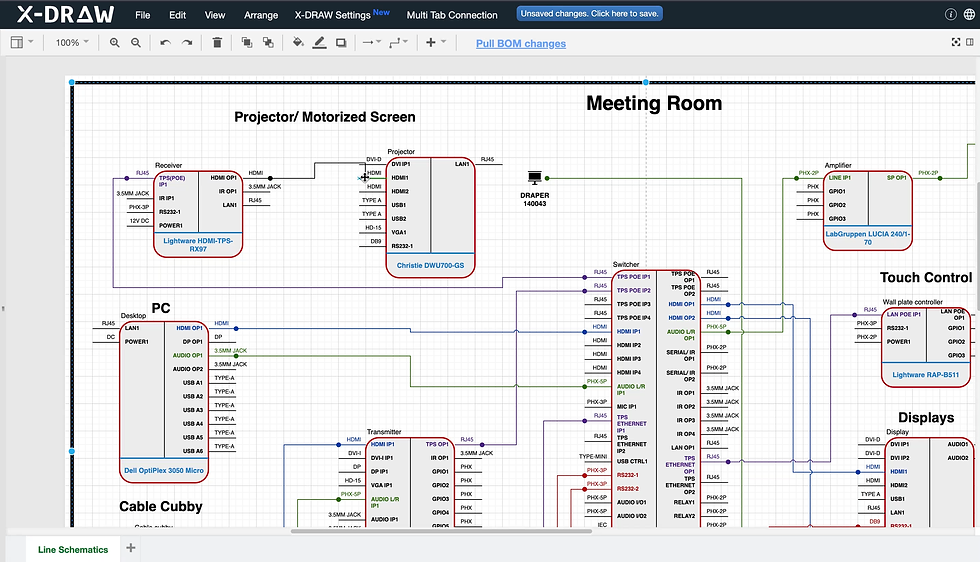
Cable documentation consumes enormous time in traditional workflows. X-DRAW automates:
Cable labeling with intelligent text generation
Styling application using colors and patterns
Connection path routing showing optimal routes
Schedule creation listing all connections comprehensively
Wiring specifications detailing installation requirements
Automated cable management improves installation accuracy while reducing documentation time by 80% compared to manual methods.
Revolutionary BOM-Drawing Synchronization

X-DRAW's standout capability involves bidirectional synchronization between Bills of Materials, AV schematics, technical drawings, and equipment documentation. Equipment changes propagate automatically across all documents without manual updates.
This synchronization eliminates mismatched documentation that causes field problems. Design modifications update BOMs instantly, while equipment substitutions adjust drawings automatically.
Massive Equipment Database Access
X-DRAW connects to extensive AV product libraries containing thousands of real manufacturer devices with accurate specifications, port configurations, dimensions, and signal formats. Engineers select actual products rather than generic blocks, ensuring documentation accuracy.
Real-world equipment data prevents specification errors that occur when using generic symbols. Comprehensive details eliminate constant datasheet lookups during design processes.
Custom Design Element Creation
AV professionals create personalized assets including custom product blocks, symbols, device templates, and proprietary layouts. Custom elements save to "My Library" for reuse across future projects, standardizing organizational workflows.
This flexibility ensures X-DRAW adapts to unique company requirements rather than forcing conformity to rigid software limitations.
Automated Rack Engineering

X-DRAW simplifies complex rack design through automation of elevations, equipment placement, organization, stacking optimization, and space planning. Intelligent positioning considers weight, cooling, and service access automatically.
Rack automation reduces engineering complexity for large deployments, completing layouts in minutes that require hours manually.
Floor Plan Design Integration

The platform enables floor plan uploads, layout editing, room design automation, visual device placement, and ceiling speaker layout generation. Spatial integration helps AV designers accelerate planning and deployment workflows significantly.
Unified Business Ecosystem
XTEN-AV (including X-DRAW) combines AV design, proposal generation, documentation, project management, CRM, and collaboration inside one unified platform. This integration removes switching between disconnected software systems, improving efficiency throughout project lifecycles.
Purpose-Built for AV Professionals
X-DRAW serves AV system integrators, consultants, installers, engineers, and low-voltage professionals exclusively. AV-focused workflows improve efficiency dramatically compared to adapting general-purpose software.
Real-Time Workflow Management
Teams collaborate simultaneously, track changes, manage revisions, share live documentation, and coordinate across departments. These capabilities improve project delivery speed and communication quality significantly.
AI-Driven Future-Ready Platform
XTEN-AV integrates cutting-edge AI workflows including automated documentation, AI-generated schematic packages, intelligent project prompts, and design conflict detection. This commitment positions X-DRAW as a future-ready platform rather than legacy software.

2. D-Tools System Integrator (SI)
D-Tools SI serves AV integrators with comprehensive project management and design capabilities. The platform combines design tools with business management features, though automation levels lag behind AI-focused platforms like X-DRAW.
Strengths include established market presence and integrated business workflows. Limitations involve more manual design processes compared to AI automation available in newer platforms.
Also read: A Beginner’s Guide to D-Tools Onboarding
3. Visio with AV Stencils
Microsoft Visio provides general diagramming capabilities that AV professionals adapt using custom stencil libraries. The tool offers familiarity for Microsoft users but lacks AV-specific automation.
Manual workflows require significantly more time than AI platforms. Collaboration limitations in desktop versions hinder team coordination.
4. AutoCAD with AV Templates
AutoCAD delivers powerful CAD capabilities that some integrators customize for AV workflows. The platform requires extensive AV knowledge and manual drafting for every element.
Steep learning curves challenge beginners. Generic functionality lacks purpose-built AV automation that accelerates specialized workflows.
5. Stardraw Design 7
Stardraw targets AV system design specifically, offering equipment libraries and schematic tools. The platform provides more AV focus than generic CAD tools but less automation than AI platforms.
Desktop architecture limits collaboration compared to cloud-based solutions. Workflow efficiency falls between generic CAD and AI automation.
6. Lucidchart
Lucidchart offers cloud-based diagramming with collaboration features. The platform suits general diagramming but lacks specialized AV automation and equipment libraries.
Simplicity appeals to casual users but limits capability for professional av system schematic diagrams. Generic templates require extensive customization for AV workflows.
7. SmartDraw
SmartDraw provides template-based diagramming with some automation features. The software offers broader accessibility than CAD tools but less specialization than AV-focused platforms.
Basic automation accelerates simple diagrams but struggles with complex enterprise AV systems. Equipment libraries lack depth of specialized AV platforms.
8. ConceptDraw PRO
ConceptDraw delivers professional diagramming capabilities with extensive template libraries. The platform provides reasonable functionality for AV diagrams without specialized AV intelligence.
Manual processes dominate workflows. Learning requirements create barriers for beginners seeking quick productivity.
9. Bluebeam Revu
Bluebeam focuses on PDF markup and collaboration for construction documents. Some integrators use it for AV documentation review and annotation rather than primary design.
Limited design capabilities position it as complementary rather than primary av schematic design software. Collaboration features excel for document review workflows.
10. SketchUp
SketchUp provides 3D modeling capabilities useful for spatial planning. Some AV professionals use it for equipment room layouts and installation visualization.
3D focus differs from 2D schematic requirements. Plugin ecosystems extend functionality but require significant customization for AV workflows.
How to Choose the Right AV Schematic Software
Assess Automation Capabilities
Automation levels directly impact productivity and return on investment. AI-powered platforms like X-DRAW reduce manual work dramatically compared to traditional CAD tools.
Evaluate how much manual drawing, labeling, and formatting remains necessary. Platforms requiring extensive manual intervention consume excessive time regardless of other features.
Intelligent automation should include schematic generation, cable labeling, rack layout, and BOM synchronization. Partial automation delivers limited value compared to comprehensive solutions.
Consider AV-Specific Functionality
Purpose-built AV tools dramatically outperform adapted generic software. AV-focused platforms understand equipment relationships, signal routing, and industry conventions natively.
Equipment libraries should contain real manufacturer products with accurate specifications rather than generic symbols. Custom device creation capabilities ensure flexibility for specialized equipment.
Validation systems that check AV-specific logic prevent errors that generic tools miss. Industry-standard conventions should apply automatically without manual formatting.
Evaluate Collaboration Features
Cloud-based platforms enable real-time collaboration impossible with desktop software. Modern workflows require simultaneous multi-user access with automatic conflict resolution.
Centralized storage eliminates version control confusion from file-based systems. Universal accessibility from any location supports distributed teams and remote work arrangements.
Change tracking maintains accountability and audit trails throughout projects. Permission controls protect sensitive information while enabling appropriate transparency.
Examine Integration Ecosystems
Standalone tools require manual data transfer between design, proposals, project management, and business systems. Integrated platforms streamline workflows by connecting these functions seamlessly.
BOM synchronization with design documentation ensures consistency across project documents. Proposal integration accelerates sales processes by leveraging design data automatically.
Project management connectivity aligns design workflows with broader project execution. Business system integration eliminates duplicate data entry across platforms.
Analyze Total Cost of Ownership
Subscription pricing should reflect actual value delivered through time savings and error reduction. Expensive software that dramatically improves productivity justifies higher costs than cheap tools requiring excessive manual work.
Training requirements represent significant hidden costs. Intuitive platforms with shorter learning curves deliver faster return on investment.
Support quality impacts productivity when issues arise. Responsive support prevents project delays while poor support creates bottlenecks.
Verify Scalability for Growth
Software capabilities should support current needs plus anticipated growth. Platforms that handle simple projects but struggle with complexity limit organizational capabilities.
Enterprise features like multi-project management, team coordination, and advanced reporting become essential as companies grow. Scalable architectures accommodate increasing project volumes without performance degradation.
User licensing flexibility allows teams to expand smoothly. Rigid licensing creates barriers to adding team members or seasonal capacity.
Test Cloud Performance and Reliability
Cloud platforms must deliver consistent performance and uptime for critical business operations. Unreliable systems create project delays and workflow disruptions.
Data security and backup procedures protect valuable project information. Redundancy and disaster recovery capabilities prevent catastrophic data loss.
Internet dependency requires assessment of connectivity reliability. Offline capabilities may prove necessary for field work or locations with poor connectivity.
Review Future Development Roadmaps
Active development incorporating emerging technologies ensures long-term viability. Stagnant platforms become obsolete as industry requirements evolve.
AI integration roadmaps indicate commitment to automation advancement. Platforms embracing machine learning and intelligent assistance position organizations for future efficiency gains.
Customer feedback incorporation suggests responsive development aligned with user needs. Vendor transparency about future plans enables informed long-term commitments.
AI and Future Trends in AV Schematic Design
Advanced Machine Learning Integration
Next-generation AI platforms will learn from historical projects, suggesting design patterns based on successful implementations. Machine learning algorithms will analyze equipment selections, system architectures, and performance outcomes to recommend optimal configurations automatically.
Predictive design will anticipate potential issues before they occur, analyzing signal integrity, power requirements, and cooling needs proactively. Intelligent recommendations will propose equipment alternatives when specifications indicate better options exist.
Automated optimization will refine designs for cost efficiency, performance characteristics, or installation simplicity based on project priorities. Learning systems will improve continuously as organizations complete more projects.
Natural Language Design Interfaces
Conversational AI will enable engineers to describe system requirements in plain language, with software generating appropriate av system schematic diagrams automatically. Voice interfaces will allow hands-free documentation updates during site surveys or client meetings.
Question-answering systems will provide instant access to equipment specifications, compatibility information, and design standards without manual research. Contextual understanding will interpret ambiguous requests based on project context.
Documentation generation from verbal descriptions will accelerate preliminary design phases dramatically. Revision commands through natural language will streamline design iterations.
Virtual and Augmented Reality Integration
VR visualization will enable immersive exploration of designed systems before installation, allowing clients and installation teams to experience spaces virtually. Spatial understanding from VR will improve design decisions regarding equipment placement and user interaction.
AR overlays will project av system schematic diagrams onto physical spaces during installations, guiding technicians through complex implementations. Mixed reality training will prepare installation teams using virtual equipment before handling actual devices.
Remote assistance through AR will connect field technicians with engineering experts who guide installations by annotating live video feeds. Error prevention through AR guidance will reduce field mistakes significantly.
Intelligent Design Validation and Simulation
Advanced simulation engines will model audio coverage, video signal quality, network bandwidth, and control system responsiveness before physical installation. Virtual commissioning will identify problems during design phases rather than during expensive on-site troubleshooting.
Physics-based modeling will predict acoustic performance, signal degradation, and environmental impacts accurately. What-if analysis will enable rapid exploration of design alternatives with quantified performance comparisons.
Standards compliance checking will verify designs against building codes, accessibility requirements, and industry regulations automatically. Automated documentation will generate compliance reports for permitting processes.
Internet of Things Integration
IoT connectivity will enable AI platforms to monitor installed systems, comparing actual performance against design specifications. Feedback loops from operational data will inform future design improvements and equipment recommendations.
Predictive maintenance systems will identify potential failures before they occur, automatically generating service documentation. Performance analytics will validate design assumptions against real-world results.
Asset tracking through IoT will maintain accurate inventories of installed equipment, supporting lifecycle management. Usage analytics will guide optimization of existing systems based on actual utilization patterns.
Generative Design Algorithms
AI-driven generative design will create multiple design alternatives automatically, optimizing for specified criteria like cost, performance, or installation complexity. Algorithmic exploration will discover solutions that human designers might not consider.
Constraint-based generation will ensure all alternatives meet requirements while maximizing desired characteristics. Comparative analysis will present trade-offs between alternatives clearly, supporting informed decision-making.
Continuous optimization will refine designs iteratively, improving solutions through multiple generations of automated refinement.
Blockchain for Design Documentation
Distributed ledger technology will create immutable records of design decisions, changes, and approvals. Audit trails through blockchain will provide indisputable documentation for liability protection and quality assurance.
Smart contracts will automate approval workflows and milestone-based payments. Decentralized storage will prevent documentation loss while maintaining security.
Advanced Collaboration Technologies
Holographic meetings will enable distributed teams to interact with 3D visualizations of designs collaboratively. Gesture-based interfaces will make design manipulation more intuitive than mouse-driven interactions.
AI facilitation of meetings will capture decisions, assign tasks, and update documentation automatically. Real-time translation will enable global teams to collaborate across language barriers seamlessly.
Common Mistakes to Avoid and Best Practices
Mistake 1: Choosing Software Based Only on Price
Low-cost solutions often hide expensive hidden costs in training time, manual work requirements, and error correction. Cheap software that requires 3x longer to produce documentation costs more than efficient platforms with higher subscription fees.
Best Practice: Calculate total cost of ownership including training, productivity impact, and error reduction. Efficient platforms deliver superior return on investment despite higher initial costs.
Mistake 2: Inadequate Training Investment
Organizations frequently adopt new software without sufficient training, limiting actual productivity improvements. Undertrained teams use only basic features, missing advanced capabilities that justify platform selection.
Best Practice: Provide comprehensive training covering basic operations through advanced automation features. Ongoing education keeps teams current as platforms evolve.
Mistake 3: Failing to Establish Design Standards
Inconsistent documentation across projects creates confusion and reduces professional image. Ad hoc approaches waste time making design decisions that standardization resolves once.
Best Practice: Develop comprehensive design standards covering symbols, formatting, labeling conventions, and sheet organization. Template libraries capture standardized approaches for consistent application.
Mistake 4: Neglecting Collaboration Workflows
Cloud capabilities remain unused when organizations fail to establish clear collaboration protocols. Undefined workflows create confusion about roles, responsibilities, and approval authorities.
Best Practice: Document collaboration procedures defining who accesses projects, how changes are communicated, and approval processes. Clear protocols prevent workflow bottlenecks.
Mistake 5: Ignoring Integration Opportunities
Standalone tools force manual data transfer when integration capabilities exist. Disconnected workflows create duplicate entry, version inconsistencies, and communication gaps.
Best Practice: Implement available integrations connecting design, proposals, project management, and business systems. Seamless data flow eliminates inefficiencies from manual transfer.
Mistake 6: Over-Relying on Automation Without Validation
Automation delivers tremendous efficiency but shouldn't eliminate engineering judgment. Uncritical acceptance of automated outputs occasionally allows errors to reach documentation.
Best Practice: Review generated designs for logical consistency and project-specific requirements. Intelligent validation combines automation efficiency with engineering oversight.
Mistake 7: Maintaining Outdated Equipment Databases
Product libraries require regular updates as manufacturers introduce new equipment. Stale databases lead to specification errors and procurement problems.
Best Practice: Establish regular update schedules and verify equipment availability during design. Current databases prevent field issues from discontinued or superseded products.
Mistake 8: Poor Version Control Practices
Cloud platforms with built-in version control still require disciplined naming conventions and milestone documentation. Chaotic versioning creates confusion about design currency.
Best Practice: Implement clear version numbering systems and document significant milestones. Organized history supports accountability and decision tracking.
FAQ Section
Why are AV teams switching from CAD to AI design software?
AV teams transition to AI platforms because automation reduces documentation time by 60-75% while improving accuracy. Traditional CAD tools require manual drafting for every element, whereas AI software generates complete av system schematic diagrams automatically. Cloud-based AI platforms enable collaboration impossible with desktop CAD systems, supporting modern distributed workflows effectively.
What makes AI AV design software better than traditional CAD?
AI av design software understands audiovisual system architecture natively, automatically generating proper signal routing, cable specifications, and connection logic. Generic CAD tools lack domain knowledge, forcing engineers to manually research and implement every design decision. Purpose-built automation in AI platforms accelerates AV-specific workflows dramatically compared to adapting general-purpose software.
How much time does AI design software save compared to CAD?
AI automation typically reduces av schematic design time by 60-75% compared to manual CAD workflows. Projects requiring 20-40 hours with traditional methods complete in 5-10 hours using AI platforms like X-DRAW. Time savings come from automated schematic generation, intelligent cable labeling, rack layout automation, and BOM synchronization.
Can beginners use AI AV design software effectively?
Modern AI platforms like X-DRAW provide intuitive interfaces with intelligent prompts that guide new users through design processes. Purpose-built workflows designed specifically for AV professionals reduce learning curves dramatically compared to complex generic CAD software. Comprehensive training resources and responsive support accelerate beginner productivity significantly.
Does AI software replace AV engineering expertise?
AI automation enhances rather than replaces engineering expertise. Platforms handle repetitive drafting tasks, allowing engineers to focus on system architecture, performance optimization, and complex problem-solving. Intelligent tools accelerate workflows while human judgment remains essential for design decisions, requirement interpretation, and quality validation.
What ROI can companies expect from AI design software?
Organizations typically achieve 60-75% reduction in documentation time, enabling completion of more projects with existing staff. Time savings translate directly to improved profitability, while reduced errors decrease costly field rework. Most companies realize positive return on investment within 3-6 months of adoption through increased capacity and reduced overhead.
How does cloud-based design software ensure data security?
Enterprise-grade cloud platforms implement multiple security layers including data encryption, access controls, regular backups, and redundant storage. Reputable vendors maintain security certifications and compliance with industry standards. Cloud security often exceeds protection possible with desktop systems vulnerable to local hardware failures and theft.
Is internet connectivity required for cloud AV design software?
Cloud platforms require internet connectivity for access, though some offer limited offline capabilities for specific functions. Reliable connectivity proves essential for real-time collaboration features. Organizations should assess network reliability and consider backup connectivity for critical operations.
Conclusion
Modern AV teams abandon traditional CAD tools in favor of AI av design software because automation, collaboration, and purpose-built functionality deliver undeniable advantages. AI platforms reduce av schematic design time by 60-75% while improving accuracy, enabling AV system integrators to compete effectively in 2026's demanding market.
Generic CAD software designed for mechanical engineering forces AV professionals to adapt tools never intended for audiovisual workflows. AI av design platforms like X-DRAW eliminate this mismatch through purpose-built automation that understands AV equipment relationships, signal routing requirements, and industry documentation standards natively.
Cloud-based architecture enables real-time collaboration and universal accessibility that legacy desktop CAD systems cannot match. Distributed teams work simultaneously on projects without version control conflicts, maintaining documentation consistency across organizations. Centralized storage provides single sources of truth that prevent confusion from file-based workflows.
Automated validation catches design errors before reaching installation teams, preventing costly field corrections that plague manual processes. Intelligent checking verifies equipment compatibility, connection logic, and specification accuracy automatically, improving overall documentation quality dramatically.
X-DRAW leads the industry as the premier ai av design software specifically engineered for AV professionals. The platform's comprehensive automation, massive equipment libraries, cloud collaboration, and integrated business ecosystem deliver unmatched value for system integrators, consultants, and installers. Organizations adopting X-DRAW gain decisive competitive advantages through faster project delivery, superior documentation quality, and more efficient resource utilization.
Future developments incorporating advanced machine learning, natural language interfaces, virtual reality visualization, and IoT integration will further transform av schematic design workflows. Forward-thinking AV companies investing in AI platforms today position themselves to leverage emerging technologies that accelerate efficiency continuously.
The transition from CAD to AI represents not merely incremental improvement but fundamental transformation of how audiovisual professionals design, document, and deploy systems. Organizations clinging to legacy methods while competitors embrace AI automation risk obsolescence in increasingly competitive markets demanding speed, accuracy, and collaboration.


Comments